Last January, I posted a link of an electronic whiteboard that teachers can use for classroom presentations. This time, there is a better applet that you can use for presenting as well as teaching mathematics. This applet was created using Dbook, a Japanese software that enables teachers to create intereactive electronic books. I will post a separate article later about it.
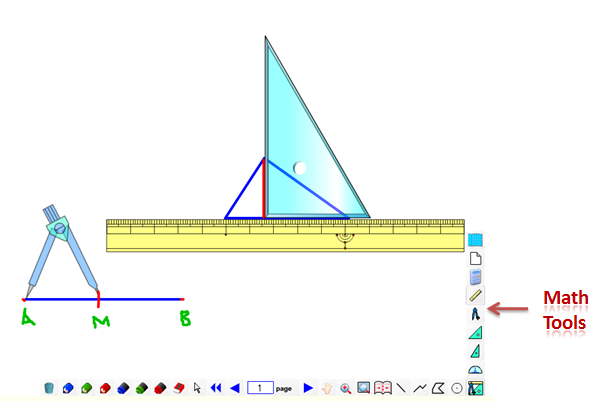
The Mathematics Whiteboard
This applet has the usual pens and eraser tools. What is more interesting is that it has also mathematical tools such as ruler, compass and straightedge, protractor and triangles. You can also draw point, line and circle tool. Unfortunatley, I can’t find a way to upload it in a free server, since it contains an executable file (most servers won’t allow it), but you can download it here and use it offline.
Dbook is a Flash-based program, so you might need a Flash Player.
Update: If you cannot download the white board applet in the link above, click here to download it from another location.


Stumble It!


This page cannot open.
Which page? The Whiteboard software? Your computer might have no flash player. YOu should download it.
Please let me know if it is still not working.
[...] Update: I have uploaded a better whiteboard software added with math tools such as compass, straightedge, triangle and protractor here. [...]
“Unfortunatley, I can’t find a way to upload it in a free server, since it contains an executable file (most servers won’t allow it), but you can download it here and use it offline.”
The above link does not work….
try clicking the link in the update text. my apologies.
I downloaded it from the link given. The file name downloaded is “whiteboard.zipx”. Is there any software through which I can unzip it (I am assuming it to be a zip file)? I am unable to use it. I use Windows 7.
I think I used the latest version of Winzip. Try downloading the trial version. Please inform me if you still have problems, so that I can send you another zipped file using other archivers.
Thanks for sharing good things.
you are most welcome.
I’m having the same problem as Srinivasan Iyer. I downloaded it, but what program do I need to use to open it? This is so cool.
@Jessica
Nope. just open it with your browser.
I downloaded the Classic Whiteboard software, but there are no tools. Are there links to two different software apps?
I should also mention that I downloaded the software on a mac. Does that make a difference?
The classic whiteboard is available in mac. Not sure about this one. This is not really a software but an output (blank worksheet) of the Dbook software. I am going to write about it next month.
I had downloaded the white board..Its works amazing .I don’t know how to move to next page..
Hmmm… I think it has no next page. It’s actually a customized applet. It works just like a whiteboard. I’ll see what I can do.
Is this white board share between multiple user ..Like 3 people a,b,c are there. one white board share between a and b..for c new white board can be shown..like this it work?
Nope, it’s not capable of multiple users.
I have one version downlaoded and working without the geometry tools: straightedge, protractor, traingles.
I downloaded the whiteboard.zipx, but I cannot find anything to uppackage it.
What do I do with .ZIPX files?
I am using a PC.
@Edb: use Winzip to extract it.
[...] mathematics electronic whiteboard that I have posted here was an empty file of dbook. If you want to know more about dbook, and download the software, click [...]
[...] Free Mathematics Whiteboard Applet [...]
[...] Free Mathematics Whiteboard Applet [...]
[...] Free Mathematics Whiteboard Applet [...]
Hi, Bautista. I really like this application. However I have problem in using the compass (rounder). While trying to draw only the arcs, it auto-completes into a circle (if care is not taken and turned in the opposite direction) and while trying not to turn in the opposite direction, I turn up changing the radius. In short, using the compass, is a bit challenging for me. Is it the same for you too. If not can you suggest some tips in using the compass.
Secondly, I feel that the compass is smaller then the rest of the instruements. But I think, one can resize the compass.
Also can you suggest other such softwares where we can teach geometrical constructions on the computer.
I basically teach Maths my students on the computer using a pen tablet and Microsoft One Note (drawing tools) and Cursor Attention v1.4 (as cursor tool). I also use Geogebra to explain theorems and propeties. So I am desperately in need of a Geometrical Construction software that can be used to teach.
Thanks again for your contributions. Happy belated Pi day.