Latex Tutorial: Commonly Used Latex Commands
INTRODUCTION
In my previous latex post, we have seen that Latex is capable of displaying complex mathematical expressions in blogs and forums. In this post, we will discuss the very basics Latex – the most commonly used symbols in high school mathematics and how to code them.
Almost all Latex commands or codes begin with the \ symbol. For example, we want to write a fraction, we must use the \frac command. If we want to use Latex in a WordPress blog, we should enclose it with two dollar signs (see Figure 2) with the word “latex” after the first dollar sign. The dollar signs and the word “latex” is not a latex command, but it tells WordPress (or other applications) that the enclosed text is a mathematical expression and should be displayed in Latex form. Blogs and forums have different ways of embedding Latex commands (see my previous latex blog for further explanation), so you must know how they work. In the following discussion, we will use the WordPress format.
If we want to copy the text writtenbelow (without the drawing, of course), we can use a combination of text and Latex in writing the solution.
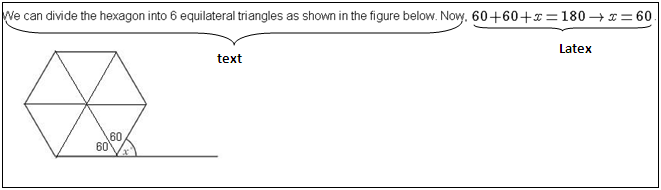
Figure 1 – A forum post embedded with Latex
The solution was written as follows:
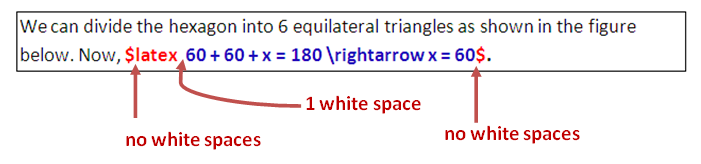
Figure 2 – The Latex code of the text in Figure 1
You should notice that the only latex command above is the \rightarrow command, but the equations are all written in Latex. This is because most of the time, it is advisable to write entire mathematical expressions in Latex to make it look better in web pages.
You should also be careful about the spaces between in your latex code. No spaces before and after the dollar sign, and 1 space after the word “latex”.
BASIC COMMANDS
Below are the basic commands commonly used in high school mathematics. If you want to learn more about the other symbols, a list of symbols can be viewed here and a comprehensive list can be viewed here.
Exponents and Subscripts
In Latex, the symbol ^ is used for exponents and the symbol _ is used for subscript. The {} symbol is used for grouping.
| Expression | Command | Notes |
 |
2^3 | |
 |
2^{10} | Note how {} is used. 2^10 will yield |
 |
p_k | |
 |
x^{3}_1 | |
 |
2^{a_k} | |
 |
t_{n – 1} | Try omitting the {} and see what happens. |
 |
c^2 = a^2 + b^2 |
Fractions
The command \frac is used to type fractions in Latex. The syntax is \frac{numerator}{denominator}.
| Expression | Command | Notes |
 |
\frac{2}{3} | |
 |
\frac{3}{x + 5} | |
 |
\frac{5}{x + \frac{1}{x}} | Notice that enclosed by the blue braces are the numerator and denominator of a fraction in the denominator, there is another fraction. |
Radicals
Radicals are written using the the \sqrt{expression} command. If the index, however, is greater than 2, the syntax is \sqrt[index]{expression}. (See examples 4 and 5}
| Expression | Command | Notes |
 |
\sqrt{5} | |
 |
\sqrt{a + b} | |
 |
\sqrt{a + \frac{1}{a}} | |
![\sqrt[3]{x + 3}](http://s0.wp.com/latex.php?latex=%5Csqrt%5B3%5D%7Bx+%2B+3%7D&bg=ffffff&fg=000&s=0&c=20201002) |
\sqrt[3]{x + 3} | You can write the index of the radical before the radicand expression. |
![\sqrt[5]{(32)^2}](http://s0.wp.com/latex.php?latex=%5Csqrt%5B5%5D%7B%2832%29%5E2%7D&bg=ffffff&fg=000&s=0&c=20201002) |
\sqrt[5]{(32)^2} |
Geometry
| Expression | Command | Notes |
 |
\overline{AB} \bot \overline{CD} | \botis the symbol for perpendicular |
 |
\angle {ABC} \cong \angle {PQR} | |
 |
\Delta{PQR} \approx \Delta{XYZ} | Delta, the fourth letter of the Greek alphabet, is the symbol for triangle |
With the Latex commands you already know, you will be surprised that you can already code a lot of expressions. Now try coding the quadratic formula. The code form 
The fraction 
\displaystyle\frac{3}{x+5}
will display 
GOING FURTHER
You can do a lot more things using Latex. You can create documents, articles, create cross references among your documents and so on. In fact, many books and ebooks nowadays are coded in Latex. In creating documents, however, we will need a Latex editor and a compiler. I am planning to make a tutorial on how to make Latex documents using a Latex editor (not very soon though), so you may want to subscribe to my blog for later updates if you are interested.
Mr. Kogler has also a latex tutorial for for advanced users here.
Note: If you want to test some of the latex commands, feel free to use the comment box.