Monthly Archives: June 2010

Top 100 Tools for Learning 2009

If you are a teacher, and you are not using one of the software mentioned here, hmmm…, maybe you should think about learning one.

I hope Jane Hart’s presentation will give you an idea what Web 2.0 tools you need to learn.

Gee, I use 36 of these. Hmmmm… does that make me a Web 2.0 addict?

Happy learning! :-)

Milkshakes, Beads, and Pascal’s Triangle

Note: This is the first part of the Binomial Theorem Series

Binomial Theorem I: Milkshakes, Beads, and Pascal’s Triangle

Binomial Theorem II: The Binomial Expansion

*************************************

The Milk Shake Problem

Problem 1: Issa went to a shake kiosk and want to buy a milkshake. The shake vendor told her that she can choose plain milk, or she can choose to combine any number of flavors in any way she want. There are four flavors to choose from: Apple, Banana, Chico, and Durian.

How many possible combinations can Issa create?

It is clear that Issa can choose her milk shake to have no flavor (pure milk shake), one flavor, two flavors, three flavors, or four flavors. The possible combinations are shown below.
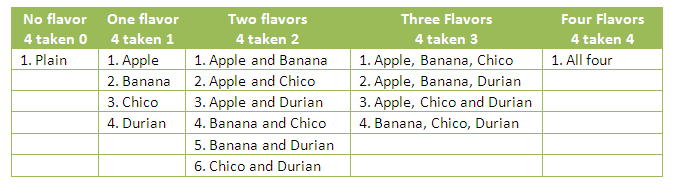
Table 1

Continue reading

GeoGebra Tutorial 21 – Spreadsheet and Similarity

This is the 21st tutorial of the GeoGebra Intermediate Tutorial Series. If this is your first time to use GeoGebra, I strongly suggest that you read the GeoGebra Essentials Series.

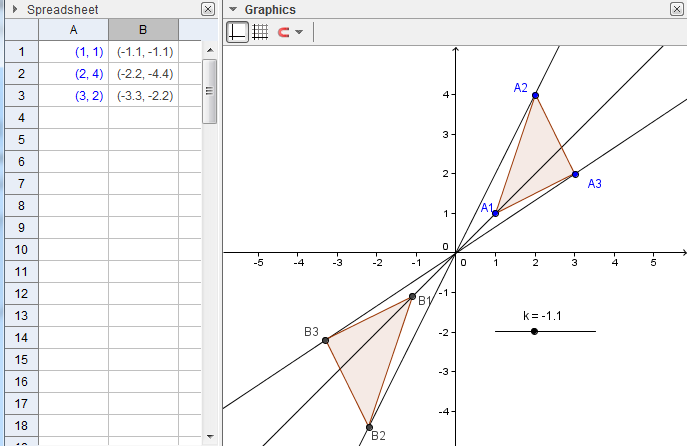
In this tutorial, we  investigate what happens if we multiply the coordinates of the vertices of a triangle with a constant.  First, we  plot three points which will be the vertices of our triangle, and then draw the triangle using the polygon tool. Next, we will construct slider k, and see what happens if we multiply the coordinates (x1,y1), (x2,y2) and (x3,y3) of the vertices of our triangle by k. We also explore the relationship between the original triangle and the triangles  with coordinates (kx1,ky1), (kx2,ky2) and (kx3,ky3).

If you want to follow this tutorial step-by-step, you can open the GeoGebra window in your browser by clicking here.  You can view the output of this tutorial here.

Step-by-Step Instructions

1. Open GeoGebra. Use the View menu from the menu bar to show the Axes and the Spreadsheet View.
2. To show labels of points during construction, click the Options menu, click Labeling, then click New Points Only.
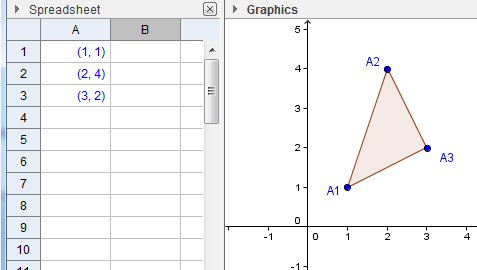
3. In the spreadsheet, type the following entries: (1,1) in cell A1, (2,4) in cell A2 and (3,2) in cell A3 (see Figure 1). Notice, that GeoGebra automatically plots the points with the given coordinates and uses cell addresses as name of points.
4. Now, select the Polygon tool and click the points in the following order: A1, A2, A3 and then A1 to construct a triangle.

Figure 1

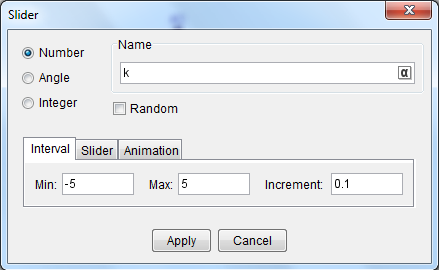
5. We now construct slider k. To construct the slider, select the Slider tool and click a vacant space in your Graphics view to display the Slider dialog box (see Figure 2).
6. In the dialog box, replace the default name with k in the Name text box, leave the other values in the dialog box as is, and then click the Apply button.

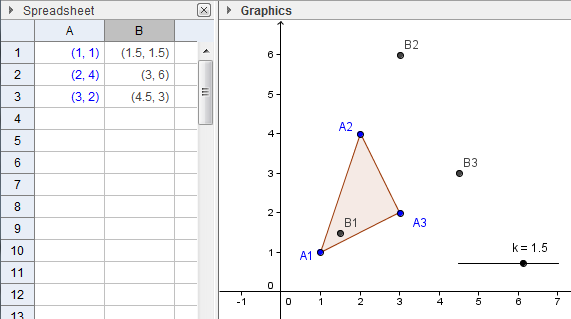
7. We now multiply the coordinates of points A1, A2 and A3 with the value of k. To do this type the following values: =A1*k in cell B1, = A2*k in cell B2 and =A3*k in cell B3.

8. Move the slider and be sure that k does not equal 1, so that the points will not overlap. Use the Polygon tool to construct triangle B1B2B3.

Figure 3

9. Move the sliders. What do you observe?
10.  Notice that when k = 1, the corresponding points overlap and the names also overlap. We will use the Advanced tab to hide points B1, B2 and B3 when k=1. To do this, highlight B1 up to B3 in the spreadsheet window, and then right click the selection and click Object Properties to reveal the Object Properties dialog box.
11.  In the Object Properties dialog box, select the Advanced tab and type k ≠ 1 in the Condition to Show Object text box and click the Close button. You can find the ≠ symbol in the drop down list box right next to Condition to Show Object text box. This means, that GeoGebra will not show the points B1, B2 and B3, when k=1.
12.  Move the vertices of triangle A1A2A3. What do you observe?  Is there a relationship between the two triangles?
13.  Connect the the corresponding points of the triangle – that is connect A1 to B1, A2 to B2 and A3 to B3. What do you observe?
14.  Investigate the figures, and use additional tools if necessary. Write your observations and make conjectures about them.

Related Posts Plugin for WordPress, Blogger...