Tag Archives: geogebra parallel line tool

GeoGebra Basic Construction 7 – Rhombus

This is the seventh tutorial in the GeoGebra Basic Construction Series. If you are not familiar with GeoGebra, you may want to read the Introduction to GeoGebra post and prior tutorials in the series. They contain the pre-requisites of this tutorial.

In the tutorial below, menu commands, located in the menu bar, are in green bold text, and submenus are denoted by the > symbol. For example, Options>Labeling> New Points Only means, click the Options menu, choose Labeling from the list, then select New Points Only. The tool texts are colored orange. For example, New Point means the new point tool.

We have already discussed on how to construct a rhombus using a slider.  In this tutorial, however, we will construct a rhombus mimicking compass and straightedge construction. In this tutorial, we will not use the slider tool.

Continue reading

GeoGebra Essentials 2 – Constructing a Rectangle

This is the second tutorial in the GeoGebra Essentials Series. If this is your first time to use GeoGebra, it is important that you read the Introduction to GeoGebra post. It contains the pre-requisite of this tutorial. It is also important to read the GeoGebra Essentials 1. This tutorial is just a repeat of the GeoGebra Basic Construction 5, but I have put a more thorough discussion on free, semi-free and independent objects.

In the tutorial below, menu commands, located in the menu bar, are in bold text, and submenus are denoted by the > symbol. For example, Options>Labeling> New Points Onlymeans, click the Options menu, choose Labeling from the list, then New Points Only. The tool texts are colored light red. For example, New Point means, the New Point tool. Continue reading

GeoGebra Basic Construction 6 – Constructing a Parallelogram

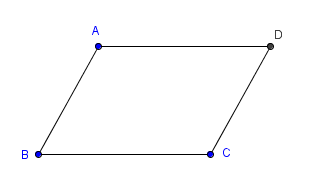
In this tutorial, we are going to use the parallel line tool of GeoGebra to construct a parallelogram shown in Figure 1.  To construct the parallelogram, we first construct points AB and C. Then, we use the parallel line to construct a line parallel to AB and passing through point C, then construct another line parallel to BC and passing through pointA. We will use the intersection of the two lines to determine the fourth vertex of our parallelogram.

Figure 1

If you want to follow this tutorial step-by-step, click here to open the GeoGebra window in your browser. Continue reading

Related Posts Plugin for WordPress, Blogger...